Angular Material theme builder
Build Angular Material themes in minutes, not days
Tune 900+ tokens visually, preview real components, export paste-ready SCSS.
Free. No signup required.
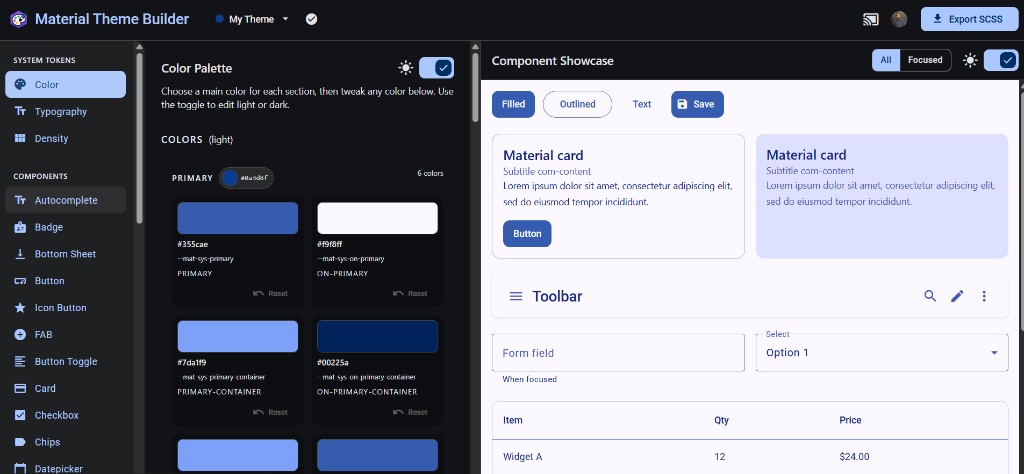
Start from a built-in theme
Browse all themes


Built by an Angular Material instructor
Manual Material theming: the hidden time tax
Without a visual builder, theming Angular Material often looks like this:
- 1–2 hrsfinding the right Material token
- 2–3 hrschecking light and dark states
- 2 hrstesting buttons, forms, dialogs, tables, and edge states
- 1 hrcleaning up mat.theme() and component overrides
≈ 1 full day
before the UI feels right
There’s an easier way.
See it in action
Watch the basic workflow: pick a theme, tune tokens visually, preview components, and export SCSS.
Speeds up Angular Material CSS for our site overhaul.

How it works
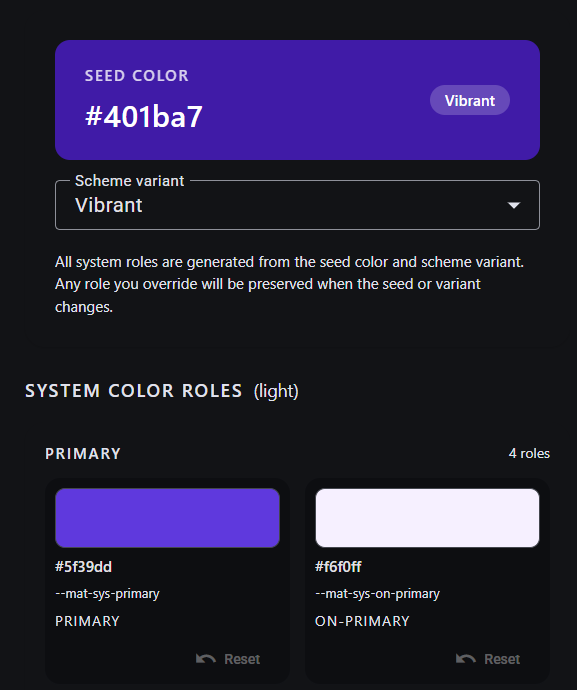
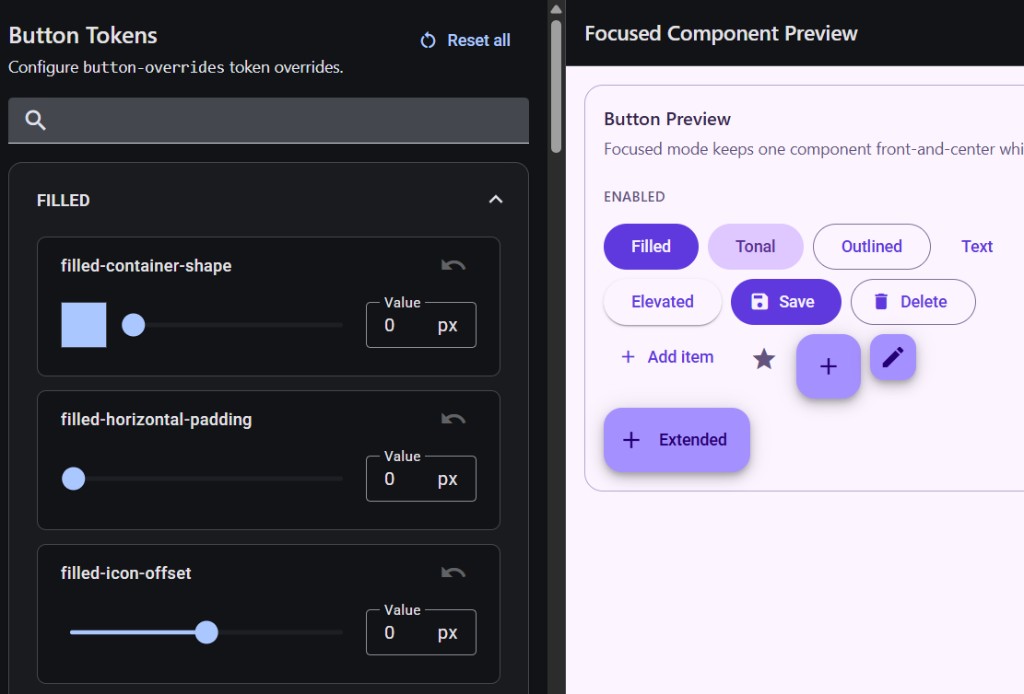
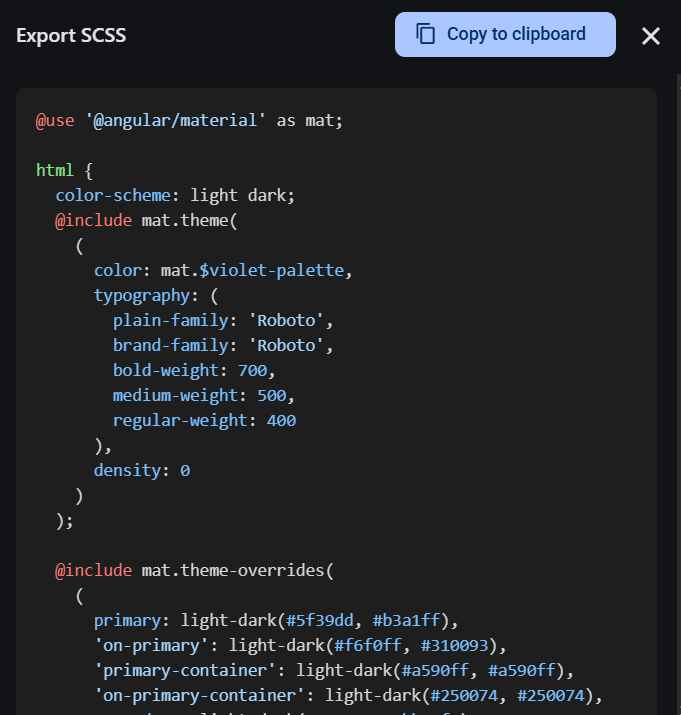
Step 1: Pick a seed color
No more edge-case Material components left behind
Buttons, form fields, dialogs, tables, steppers, tabs, and 28 more components — 907 tokens in total — so your theme holds up beyond the happy path.
Ready to theme your Angular Material app?
Open the full builder, tune tokens visually, and export paste-ready SCSS — no card required.
Get started — freeFree. No signup required.
What builders say
Used by 207 Angular builders, including 36 paid Pro customers.

Material 3 theming sorted in hours
The Material Theme Builder by Zoaib Khan is a great piece of software and a real timesaver, I highly recommend it! I'm working on a private project and, being the backend developer that I am, had a hard time getting to grips with Material 3 theming. Thanks to the builder I got that sorted in a matter of hours instead of days or even weeks. That was money well spent!

Huge help iterating without a designer
We don't have a designer on the team; the Angular Material Theme Builder will be a huge help iterating on our visual theme and should save us a lot of time.

Really enjoying the theme builder
Really enjoying the Angular Material Theme Builder. It saves a lot of time, and customizing individual components is a great feature—makes UI tweaks super easy.
Speeds up our Material site overhaul
Speeds up Angular Material CSS for our site overhaul and helps me learn on-the-fly—without digging through docs for examples that do not fit. Clean, easy-to-use interface too.
Why not just use the official Material Theme Builder?
The official Material Foundation builder is great for Material 3 color palettes. This builder is built for Angular Material: paste-ready SCSS, 900+ component overrides, and Live Preview on localhost.
| Official builder | This builder | +Pro | |
|---|---|---|---|
| Material 3 color roles and palettes | Material 3 color roles and palettes — M3 palette:Yes | Material 3 color roles and palettes — This builder:Yes | Material 3 color roles and palettes — Pro:Yes |
| Core Export (mat.theme() SCSS) | Core Export (mat.theme() SCSS) — M3 palette:No | Core Export (mat.theme() SCSS) — This builder:Yes | Core Export (mat.theme() SCSS) — Pro:Yes |
| Built-in Theme Export (catalog overrides) | Built-in Theme Export (catalog overrides) — M3 palette:No | Built-in Theme Export (catalog overrides) — This builder:Yes | Built-in Theme Export (catalog overrides) — Pro:Yes |
| Component Token Export | Component Token Export — M3 palette:No | Component Token Export — This builder:No | Component Token Export — Pro:Yes |
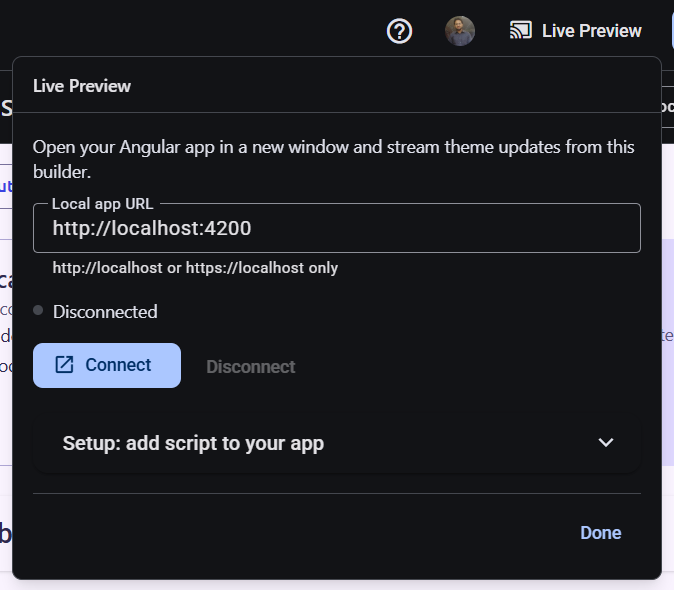
| Live Preview to localhost | Live Preview to localhost — M3 palette:No | Live Preview to localhost — This builder:No | Live Preview to localhost — Pro:Yes |

Built from Angular Material theming experience
I’m Zoaib Khan. I teach Angular on YouTube to 12k subscribers and have been covering Angular Material theming while building templates, examples, and project source code with the library. I’ve tried to cover the theming pain points I found, so you don’t have to.
- Angular tutorials for 12k YouTube subscribers
- Angular Material theming videos and examples
- Templates and project source code built with Angular Material
Money well spent — sorted Material 3 theming in hours, not weeks.
Simple pricing for Angular Material theming
Start free, no sign-in. Upgrade once for custom Component Token Export, Live Preview, and cloud themes.
Free
$0
Free forever
Full builder
System tokens, component tokens, light and dark preview
Core Export
mat.theme() SCSS, plus Built-in Theme catalog overrides when those components are unchanged.
No card required — upgrade when you need Pro
Pro
$29
One-time payment
Everything in Free
Component Token Export
Unlimited mat.*-overrides() SCSS across 34 Material components
Live Preview to localhost
Stream theme updates to your local app
10 Cloud-Synced Themes
Save client, product, or brand themes
Secure checkout via Polar 30-day refund
Frequently asked questions
Angular Material v19 or newer. Design tokens were introduced in v19.
Free: full builder and Core Export, no account. Built-in Themes include catalog component tokens when those components stay unchanged. Pro (one-time): Component Token Export for your customizations, Live Preview, and up to 10 Cloud-Synced Themes. Sign in only to buy Pro or sync themes.
One-time payment. Current price is in the pricing section.
Connect the builder to localhost and stream theme changes to your app. Pro feature; setup is in the builder toolbar.
Try Material Theme Builder free
Open the builder free. Upgrade once for custom component-token export, Live Preview, and cloud themes.
Get started — freeNo card required · 30-day refund on Pro
© 2026 Material Theme Builder
Created by Zoaib Khan · consult@zoaibkhan.com ·